 Cadenza
Recorder mode
The lesson is over and the student needs the four bars you just played.
Count in, play along to the click, stop. Cadenza writes it down properly — and gives you the file before they have closed the call.
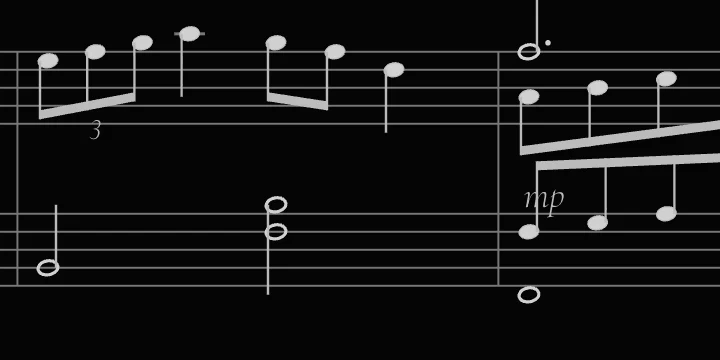
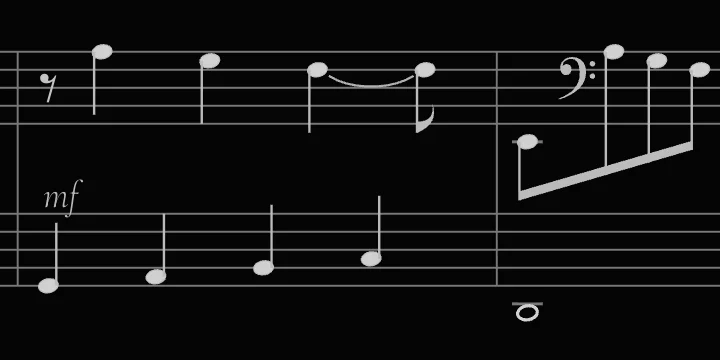
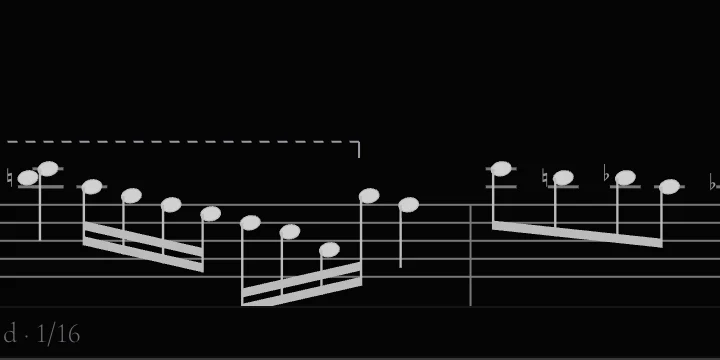
Forty-four seconds, one take, no editing. Sixteen bars of syncopated sixteenths and a habanera bass, triplets of both kinds, two voices over a moving line, clef changes each way, octave lines both directions, dynamics and two rolled chords — the notation writes itself as the take plays, and the camera follows.
Measured, not promised
One of the most accurate take-to-score engines in the world.
Every change to the quantiser must pass a benchmark: real pieces, played five different ways, with seeded human error. Note values, two voices on a staff, ties, accidentals, clef changes, octave lines, dynamics and arpeggios are written, not approximated — and every export is proof-read by a MusicXML reader that knows nothing about the writer. You will still correct something now and then; measurably less than in the transcription modes of engraving suites costing ten times more.

A real take, not a mock-up. Eight bars played to a click at 88 BPM, quantised to a 1/16 grid. Key signature found by the app; hands split by the app; every note value, tie and rest decided by the app.
The hard parts are the whole point.
- Bars, note values, ties and rests. Not a piano roll with stems drawn on it.
- Two hands, split moment by moment. It weighs where each hand just was instead of cutting at a fixed note — so the melody can dip below middle C without swapping staves.
- The key signature, then the accidentals that are still needed. Against the key at the barline, then against the last accidental on that line, in that octave. A tie does not repeat the sign.
- Erase a chord by clicking it. Erase a whole bar by clicking beside it. ⌘Z takes it back, forty steps deep.
- Fluffed bar six? Record from bar six. Whatever sounded before that point stays exactly where it was.
- Edits land in the performance, not in the engraving. Change the grid, the swing, the hand boundary or the key afterwards and nothing you erased comes back. You never replay a take to re-quantise it.

One rail: tempo, meter, length, the bar to punch in from, grid, swing, key, hand split, erase, undo. Everything after the grid can be changed once the take exists.

Takes are kept inside the app, by name — a week of lessons stays where you left it, still re-quantisable tomorrow.
What it doesn’t do yet
Three voices per staff is the ceiling, and the third only when you record it as its own voice — the automatic reading stops at two. One key signature per take: it will not follow a modulation. The tempo is set when the take starts; the rubato slider pulls phrase-level drift back onto the grid afterwards, but the slider is your hand, not an automatic transcription of free time. And the hand-splitter has no memory, so the same voicing can occasionally split two ways — recording one hand at a time pins it. If any of that is a dealbreaker, the trial will tell you in five minutes, and it is better that you find out now.
Look closer
The parts a quantiser usually gets wrong.
After the take
Fix it without replaying it.
The page is a live reading of the take — so every knob rewrites it in place.
Or just the tune
A lead sheet is one switch away.
One treble stave, melody only, no left hand — and the chord symbols go on by playing them: pick a beat, play the chord, the cursor steps to the next one. The take underneath is untouched, so you can flip back to two staves whenever you want.

And this is the file
Ink on paper, not a screenshot of a screen.
The image below is a genuine PNG export of the take above — the same engraving, in black on white, straight out of the app. The MusicXML beside it opens in MuseScore or Sibelius.

Six files out.
Pick the one the next step needs. Nothing is locked to Cadenza: the notation formats are the ones every notation program reads, and the take itself is plain JSON you can open again and re-quantise.
- The raw MIDI is what you actually played, to the millisecond — useful when the point of the recording is the timing.
- The quantised MIDI is what is written on the page, so a DAW and the printout agree.
- Stem directions are decided in the model, not in the drawing — so the picture and the MusicXML can never disagree.

The whole app can go black on white — the same switch that makes it clean to record. The keys stay photographic; everything around them turns to paper.
Three days, everything unlocked, no card — then the free Basic stays.
Want the reasoning rather than the feature list? MIDI to sheet music walks through the five judgements a transcription has to make, and why a plain MIDI import gets them wrong.
Questions about the notation
How good is the notation, really?
Good enough to hand to a student, and not a substitute for an engraving program. It gets bars, note values, ties, rests, the key signature, the hand split and the accidental placement right — those are the parts a quantiser usually fails at, and there are automated tests over each of them.
What it does not do yet is printed on this page rather than hidden: up to three voices per staff (the third when you record it as its own voice), one key signature per take, and a tempo set at the start — the rubato slider pulls drift back, but by your hand. For a four-bar example, a warm-up or a lick you want to keep, that is plenty. For a twelve-page sonata, export the MusicXML and finish it in MuseScore.
How do I use it in a lesson?
Open the chord window, the staff and the keyboard, and put them on the screen your student is watching — a second monitor in the room, or a shared window on a call. Play; the name, the notation, the lit keys and the degree in the key update together.
Collect the chords into the progression panel as you go, then export it as text or a Markdown table. When the example needs to be written out, switch to the Recorder, play it once against the click, and send the MusicXML or the PNG before the call ends.
Play it once.
macOS 12 or later · Windows 10 and 11 · no account, no card
Also in Cadenza